


Microsoft Dynamics 365 powers critical business operations for thousands of enterprises worldwide, from financial close cycles in Finance & Operations to procurement workflows in Supply Chain and pipeline management in Sales. But as D365 environments grow more complex and Microsoft’s biannual release waves accelerate change, the old approach to quality assurance is breaking down.
Manual regression testing is too slow. Brittle scripts built on Task Recordings fail after every update. And the specialized teams needed to maintain traditional Dynamics 365 testing tools are expensive, stretched thin, and often unavailable when a release wave hits.
This guide covers everything QA leaders, ERP program managers, and DevOps engineers need to know about dynamics 365 test automation in 2026 , including the types of testing that matter most, a side-by-side comparison of today’s leading tools, and how AI-powered agents are rewriting the rules for D365 automated testing across Finance, Sales, and Supply Chain modules.
Why Dynamics 365 Testing Is Getting Harder (and More Critical)
Dynamics 365 is not a static system. Microsoft ships two major release waves per year, Wave 1 (April) and Wave 2 (October), plus dozens of minor service updates in between. Each wave introduces new features, UI changes, and business logic adjustments that can silently break existing workflows.
For organizations running D365 Finance & Operations, Supply Chain, or Sales, the stakes are high. A broken purchase order workflow or a failed journal posting isn’t just a QA problem, it’s a business continuity risk. Yet most teams are still relying on dynamics 365 testing approaches that weren’t designed for this pace of change:
- Task Recording-based scripts that break whenever a UI element moves or is renamed
- Manual test cycles that take weeks to execute before every release wave
- Siloed testing by module, missing the cross-system dependencies that cause the most critical failures
- Overloaded QA teams trying to maintain hundreds of test cases across multiple D365 environments
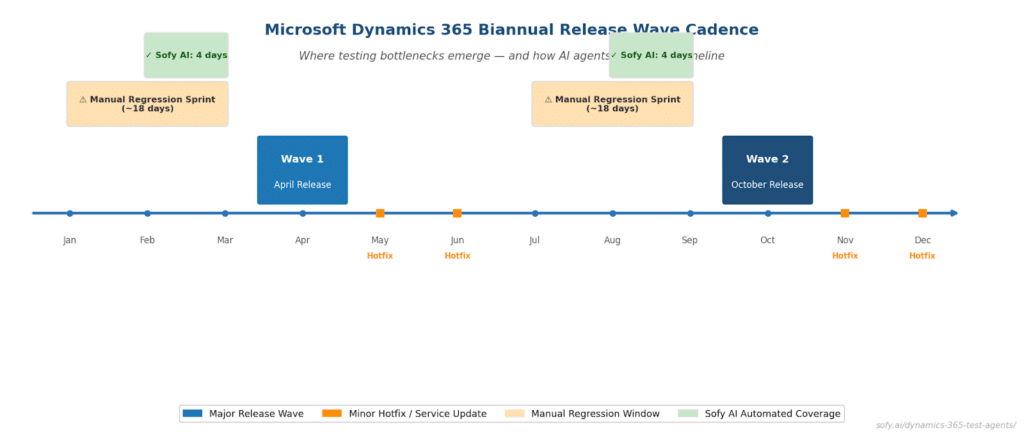
Figure 1: Microsoft’s biannual release wave cadence and where traditional testing bottlenecks emerge, compared to Sofy AI’s automated coverage window.
The result: delayed releases, production incidents, and mounting technical debt in your test suite. The solution isn’t more manual effort, it’s smarter automation built specifically for how Dynamics 365 works.
Types of Testing for Dynamics 365 F&O
Before evaluating tools, it’s important to understand the distinct testing scenarios that D365 F&O testing must cover. Each has different automation requirements, and different consequences when it fails.
Regression Testing After Release Waves
This is the most common, and most painful, testing challenge for Dynamics 365 teams. After every Wave release or hotfix, organizations need to verify that core business processes still work as expected. Regression testing for D365 means validating hundreds of workflows across Finance, Supply Chain, and Sales, ideally before the release reaches production.
The challenge: traditional scripts built on Microsoft’s RSAT tool rely on Task Recordings, which are tightly coupled to specific UI states. Any layout change, even cosmetic, can invalidate a test recording and require manual rework. D365 automated testing solutions that self-heal around UI changes dramatically reduce the maintenance overhead of regression cycles.

Figure 2: Average days required for key D365 testing activities, manual/RSAT-based vs. Sofy AI agents per release wave cycle.
End-to-End Business Process Testing
Many of the most damaging failures in Dynamics 365 environments don’t happen within a single module, they happen at the handoff points between modules. A sales order that fails to trigger a warehouse pick. A vendor invoice that posts correctly in Accounts Payable but creates an imbalanced ledger entry. A supply chain disruption that doesn’t surface until a customer shipment is missed.
End-to-end D365 testing validates these cross-module workflows in full, from the originating transaction all the way through to the financial or operational outcome. This type of testing requires a platform that understands how D365 modules relate to each other, not just how to click through a single form.
Integration Testing Across D365 Modules
D365 Finance testing, D365 Supply Chain testing, and D365 Sales testing rarely exist in isolation. Most enterprise deployments integrate multiple D365 modules with each other and with external systems, PowerBI dashboards, third-party logistics providers, custom Azure integrations, or legacy ERPs running alongside D365 during a migration.
Integration testing ensures that data flows correctly between these systems that a purchase order created in Supply Chain appears correctly in Finance, that a customer record updated in Sales propagates to D365 Customer Service and that API-connected external systems receive the right payloads at the right time.
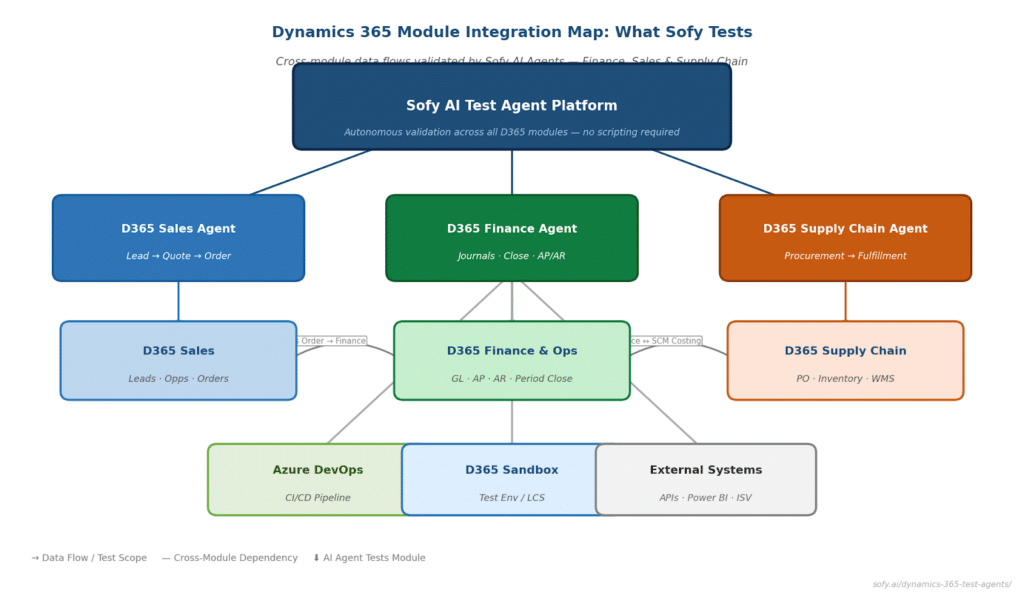
Figure 3: Dynamics 365 module integration map showing the cross-module data flows validated by Sofy AI agents across Finance, Sales, and Supply Chain.
D365 Test Automation Tools Compared: RSAT vs. Leapwork vs. Sofy
There is no shortage of Microsoft Dynamics testing tools on the market, but most were built before the current pace of D365 change demanded something fundamentally different. Here’s how the three most commonly evaluated platforms compare:
| Capability | RSAT | Leapwork | Sofy AI |
| Setup requirement | Developer + BPM recordings | Low-code designer | No-code, natural language |
| Self-healing tests | No | Partial | Yes , AI-driven |
| Cross-module E2E testing | No | Limited | Yes , all D365 modules |
| Release wave readiness | Manual re-record | Manual update | Autonomous re-validation |
| Module-specific agents | No | No | Sales, Finance, Supply Chain |
| CI/CD integration | Limited | Yes | Yes , pipeline triggers |
| No-code test creation | No | Partial | Yes |
| Reporting & analytics | Basic | Dashboard | AI-powered insights |
RSAT (Regression Suite Automation Tool): Microsoft’s native testing tool for Dynamics 365 Finance & Operations. RSAT works by recording Task Recordings in D365 and replaying them as automated tests. It’s free and deeply integrated with D365 LCS (Lifecycle Services), but it requires developer involvement to set up, doesn’t support cross-module workflows, and has no self-healing capability. Every UI change in a release wave can invalidate dozens of recordings simultaneously.
Leapwork: A low-code automation platform with D365 connectors. Leapwork offers a more visual test-building experience than RSAT and supports a broader range of applications, but it still requires manual test maintenance when D365 UI changes occur and lacks the module-specific depth needed for complex F&O workflows.
Sofy AI: Purpose-built autonomous AI test agents for enterprise ERP testing. Sofy’s D365 agents understand the business logic and data relationships within each module, Finance, Supply Chain, and Sales, enabling end-to-end testing without scripting. Tests self-heal when the UI changes, and the platform is designed from the ground up for the biannual release wave cadence.
D365 Test Automation Tools Compared: RSAT vs. Leapwork vs. Sofy
The fundamental limitation of traditional dynamics 365 test automation tools, including RSAT, is that they operate at the UI layer. They record clicks and keystrokes, then replay them. When the UI changes, the recording breaks. This model forces a constant cycle of script creation, breakage, and repair that consumes QA capacity without ever improving coverage.
AI agents work differently. Instead of recording UI interactions, they understand the business process , what a journal posting is supposed to accomplish, what data should flow from a sales order to a warehouse pick, and what a successful period close looks like in D365 Finance. This semantic understanding of ERP workflows allows agents to test outcomes, not just UI states, and to adapt when the interface changes without manual intervention.

Figure 4: How traditional script/RSAT-based testing compares to Sofy AI agents through a full D365 release wave cycle, highlighting where breakage and self-healing occur.
Sofy’s D365 agents are built around this principle, with specialized agents for each major module:
D365 Finance & Operations Agent: Terms of Payment Configuration Validation
The Sofy D365 Finance & Operations Agent validates the creation and configuration of payment terms within Microsoft Dynamics 365 Finance and Operations, ensuring accurate setup for downstream billing, collections, and cash flow management. Key test scenarios include:
- Navigation to Terms of Payment module via global search and access validation
- Creation of new payment terms with correct naming conventions (e.g., Net90)
- Validation of payment schedule configuration, including month-based definitions
- Data persistence checks to ensure successful save and record creation
- UI interaction validation across search, form entry, and save actions
- Readiness of configured terms for use in accounts receivable and invoice processing workflows
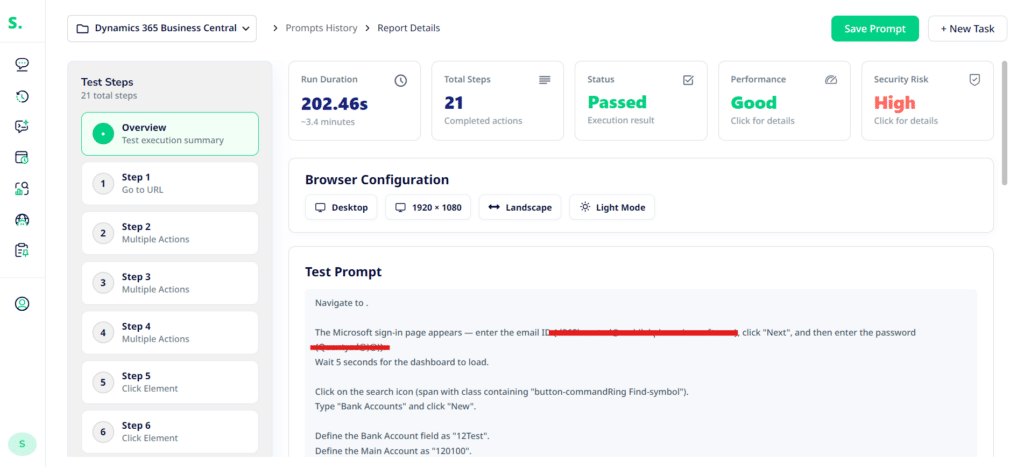
Because the Finance & Operations Agent understands the underlying data structures of Microsoft Dynamics 365 Finance and Operations, not just the user interface, it validates that payment terms are correctly defined, stored, and available for downstream financial processes, not just that the UI reflects expected values.
D365 Finance & Operations Agent: Bank Account Setup Validation
The Sofy D365 Finance & Operations Agent validates the creation and configuration of bank accounts within Microsoft Dynamics 365 Finance and Operations, ensuring accurate setup for financial transactions, reconciliations, and cash management processes. Key test scenarios include:
- Navigation to Bank Accounts module via global search and access validation
- Creation of new bank account records with correct naming conventions
- Validation of main account linkage to ensure proper general ledger mapping
- Data persistence checks to confirm successful save and record creation
- UI interaction validation across search, form entry, and save actions
- Readiness of configured bank accounts for use in payments, receipts, and reconciliation workflows

With awareness of how financial data flows beneath the application layer, the Finance & Operations Agent ensures bank accounts are not only created successfully but are structurally aligned with ledger configurations and fully usable across downstream financial operations.
Getting Started: From Manual Testing to AI-Powered Automation
The shift from manual or script-based dynamics 365 testing to AI-powered automation doesn’t have to be a rip-and-replace project. Most organizations make the transition incrementally, starting with the highest-risk workflows and expanding coverage over time.
A practical migration path looks like this:
- Audit your current test coverage: Identify which business processes have no automated coverage and which have brittle scripts that fail regularly. Finance close, procurement-to-pay, and order-to-cash are typically the highest-risk starting points.
- Prioritize by release wave impact: Focus initial automation on the workflows most likely to be affected by Wave 1 or Wave 2 changes. These are usually core F&O processes, not customizations.
- Stand up a Sofy environment connected to your D365 sandbox: Sofy connects to your D365 environment without agents or code installs. The setup process for most D365 tenants takes less than a day.
- Build your first test suite with the module-specific agent: Start with one agent, Finance, Supply Chain, or Sales, and build test coverage for your top 10–15 critical business processes. No scripting required.
- Run your first release wave validation: Use your new automated suite against the Wave preview environment. Review results, validate coverage gaps, and expand from there.
Organizations that follow this path typically achieve meaningful automation coverage for their highest-risk D365 workflows within 4–6 weeks, and are fully prepared for the next release wave without a manual regression sprint.
Ready to automate your Dynamics 365 testing?
Sofy’s purpose-built D365 agents, for Finance, Supply Chain, and Sales, give your team the module-specific depth and self-healing automation needed to stay release-ready through every Microsoft wave. No scripting. No manual re-recording. No regression sprints.
Frequently Asked Questions
Dynamics 365 test automation refers to the use of software tools or AI agents to automatically execute, validate, and report on tests within a Dynamics 365 environment, replacing or supplementing manual QA processes. Automated testing ensures that D365 workflows perform correctly after system updates, configuration changes, or customizations.
RSAT (Regression Suite Automation Tool) is Microsoft’s native D365 testing tool, built on Task Recordings. While it’s free and tightly integrated with D365 LCS, RSAT requires developer involvement, breaks with UI changes, and doesn’t support cross-module or end-to-end testing. Teams look for RSAT alternatives when they need self-healing automation, broader coverage, or no-code test creation.
D365 Finance & Operations (F&O) testing involves validating complex financial workflows, journal entries, period close, tax postings, intercompany transactions, that have direct compliance and reporting implications. Errors in F&O processes can trigger audit findings or financial restatements, making automated, high-coverage regression testing a business-critical requirement, not just a QA best practice.
Yes. Sofy supports integration with Azure DevOps and other CI/CD platforms, enabling automated D365 test execution as part of your release pipeline. Tests can be triggered on code commits, environment deployments, or a scheduled basis ahead of release wave go-lives.
Most organizations complete initial environment setup and connect Sofy to their D365 sandbox within one business day. Building an initial test suite for a priority module (Finance, Supply Chain, or Sales) typically takes 1–2 weeks, depending on the number and complexity of workflows being automated.
Yes. Sofy’s AI agents can test both standard D365 functionality and custom forms, workflows, and integrations built on top of the platform, including ISV solutions running in the same D365 environment.